Hosted Pages
Hosted Pages are secure, reusable checkout links fully hosted by Altruon. You configure them entirely from the backoffice, with no code required, and each link carries its own plan, addons, coupons and currency, with per-link conversion analytics.
Prerequisite: Complete steps 1–4 of the Quick Start first: you need a connected Payment Gateway with routing, and a connected Billing Platform.
How it works
Hosted Pages configuration is split into two layers:
- Checkout appearance (Settings > Checkout): your branding, the customer fields you collect, the post-payment redirect, and the page skin. Configured once, applied to all your hosted pages.
- Hosted Pages (Settings > Hosted Pages): each hosted page is a named checkout link with its own plan, addons, coupons and currency. Create as many as you need (one per plan, per campaign, per region, …).
When a customer opens a hosted page link, Altruon resolves the configuration server-side, creates a single-use checkout session, and renders the checkout with your branding, the configured cart, and the payment methods routed for the currency. Nothing about the plan, price or coupons is exposed in the URL.
Part 1: Configure your checkout appearance
This is site-wide and only needs to be done once.
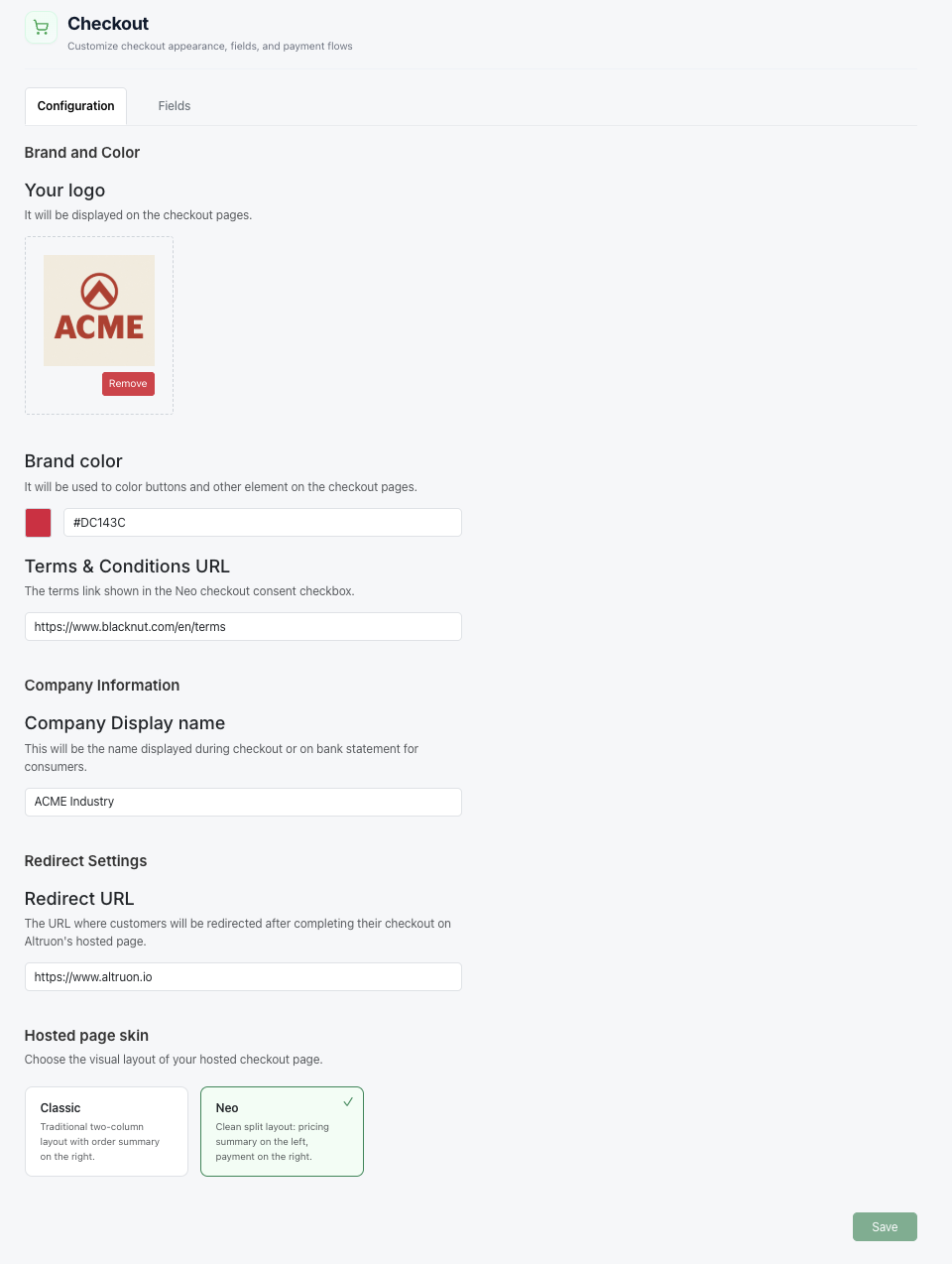
Branding & behavior
- Go to Settings > Checkout (tab Configuration).
- Configure:
- Your logo: click to upload (JPG/PNG, square format preferred). Shown in the checkout header.
- Brand color: colors the Subscribe button and interactive elements.
- Company Display name: shown at checkout and used on bank statements.
- Terms & Conditions URL: linked from the consent checkbox (used by the Neo skin).
- Redirect URL: where customers land after a successful payment (e.g.
https://your-website.com/thank-you).
- Pick a Hosted page skin:
- Classic: traditional two-column layout with the order summary on the right.
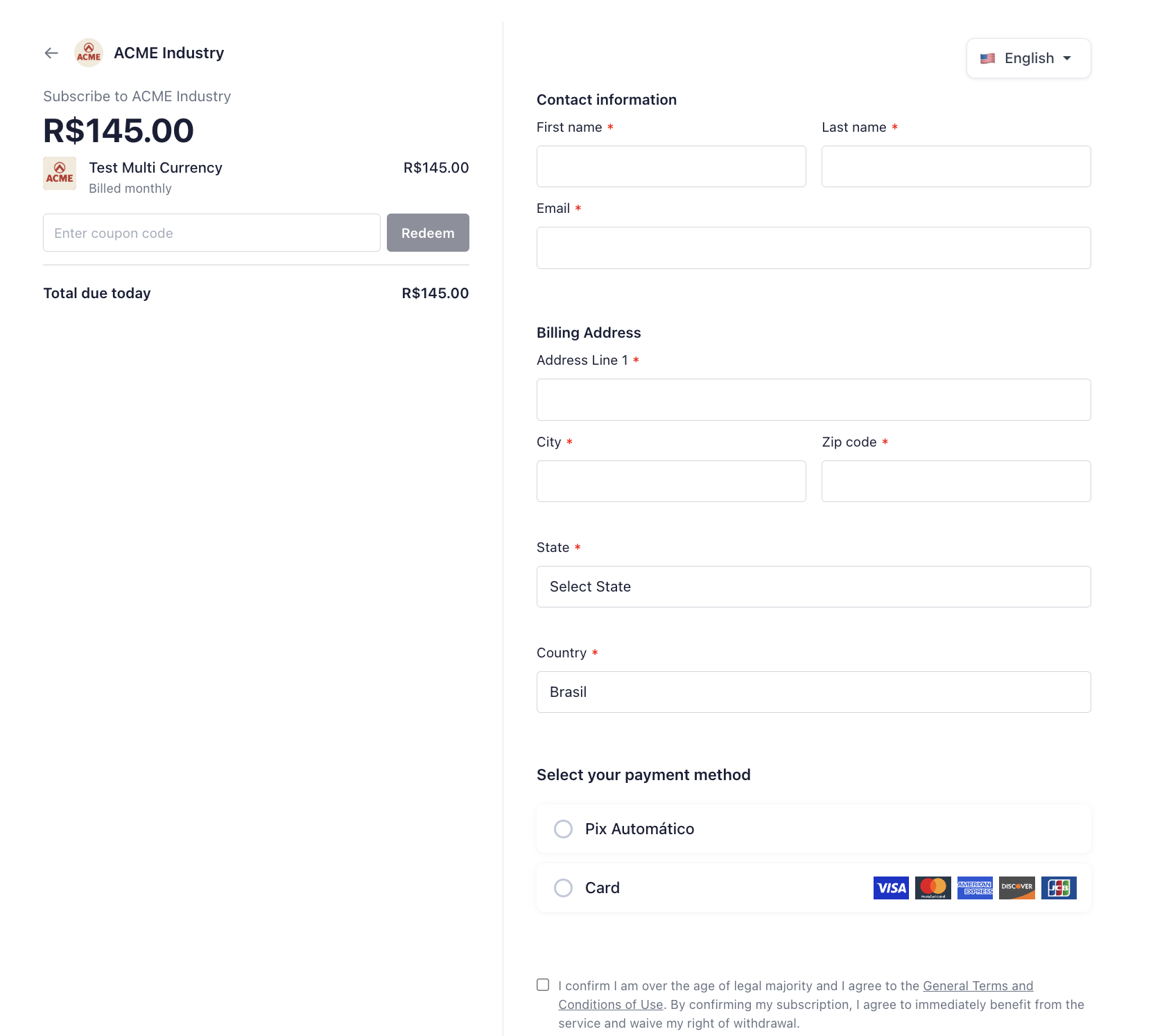
- Neo: clean split layout with the pricing summary on the left and payment on the right.
- Click Save (bottom-right).
Checkout fields
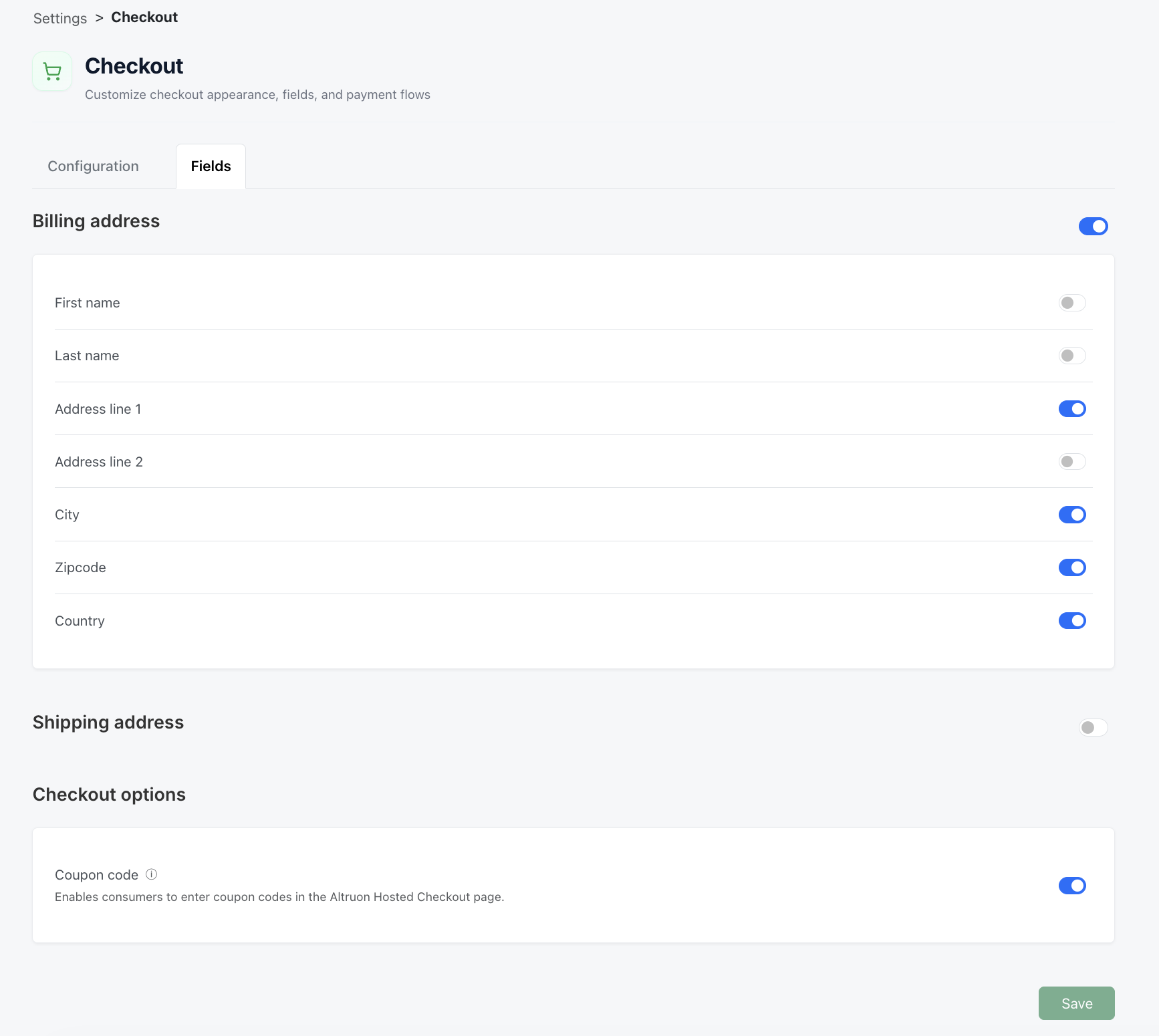
- In the same Checkout section, go to the Fields tab.
- Toggle the information you want to collect from customers:
- Billing address: First name, Last name, Address line 1, Address line 2, City, Zipcode, Country.
- Shipping address: same set of fields, collected separately.
- Coupon code: lets customers type their own coupon codes on the checkout page (independent from the coupons you pre-apply on a hosted page, see below).
Recommended: enable Billing address (Address line 1, City, Zipcode, Country). First name, Last name and Email are always collected.
- Click Save (bottom-right).
Part 2: Create a hosted page
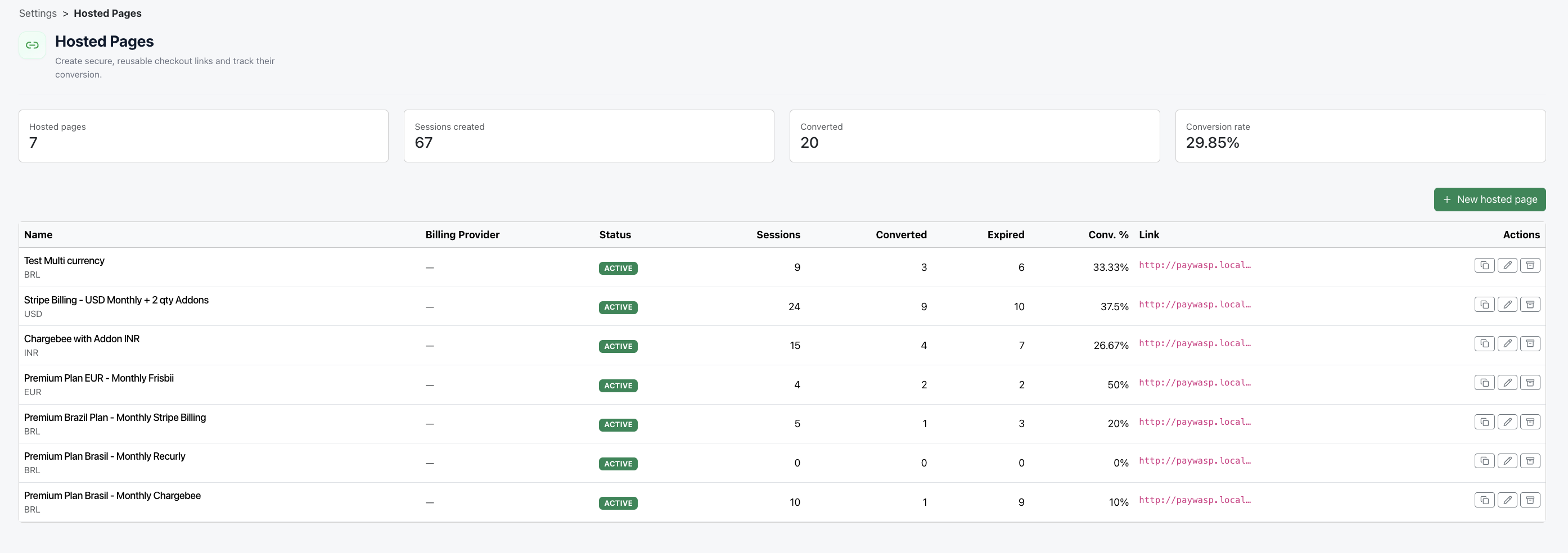
- Go to Settings > Hosted Pages.
- Click New hosted page (top-right).
- In the Create hosted page modal, configure:
| Field | Description |
|---|---|
| Name | A merchant-facing label, e.g. Pro Plan – Annual (US). Your customers never see it. |
| Billing Platform | The billing connection to create the subscription on (only active connections are listed). |
| Product Family > Item > Item Price | Drill down through your billing platform's catalog to select the exact plan price this link sells. |
| Currency | Asked only when the selected plan price supports multiple currencies. Payment methods at checkout are determined by your routing entries for this currency. |
| Coupon codes (optional) | Pre-applied discount codes, baked into the link (e.g. for a promo campaign). Customers don't need to type anything. |
| Add Addons (optional) | Attach recurring addons from your catalog, each with its own quantity (or flat fee). Available once an Item Price is selected. |
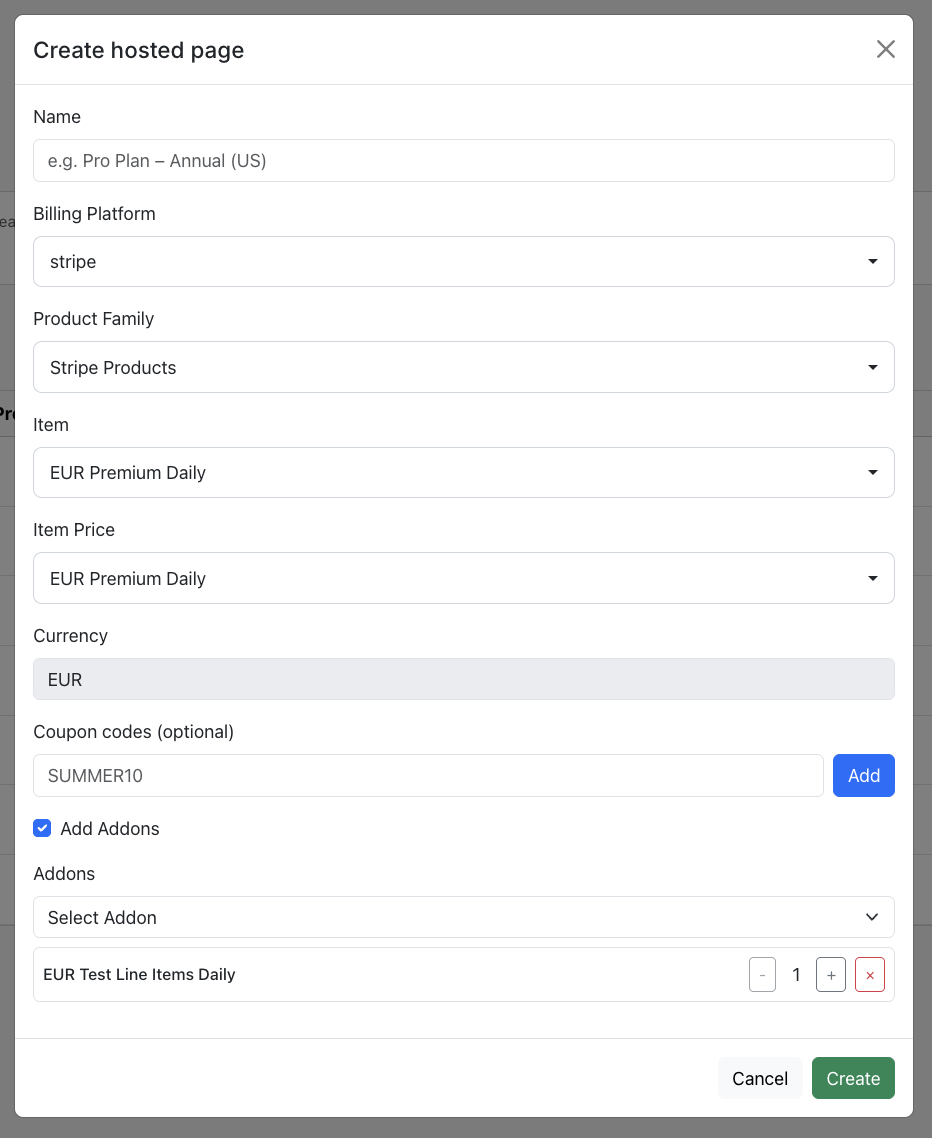
- Click Create.
The page is saved as Active and is immediately usable. Copy the URL from the Link column (or the Copy link action) and share it: embed it on your pricing page, drop it in an email, send it from your CRM.
The hosted page URL
https://{your-tenant}.altruon.io/checkout/p/{id}              (production)
https://{your-tenant}.sandbox.altruon.io/checkout/p/{id}      (sandbox)
The URL is opaque: it contains only the hosted page ID. The plan, addons, coupons and currency are resolved server-side on every visit, so they can't be tampered with, and you can edit the configuration later without changing the link.
Part 3: Manage and track your hosted pages
The Hosted Pages list gives you per-link analytics and management actions.
Analytics: for each page you see Sessions (checkouts opened), Converted (completed payments), Expired, and the Conversion rate. Summary cards at the top aggregate across all pages.
Statuses: a hosted page is always in one of three states:
| Status | Behavior |
|---|---|
| Active | The link works and customers can check out. New pages are created Active. |
| Draft | Prepared but not live: the link is rejected at checkout. Set it from the Edit modal. |
| Archived | Disabled: the link is rejected at checkout. Use Archive / Reactivate from the list to toggle. |
Editing: click Edit to change the name, status, plan, currency, coupons or addons. The link itself never changes, so anything you've already shared keeps working with the updated configuration.
Good to know: each checkout session opened from a hosted page is single-use and expires after 15 minutes. Expired sessions count in the Expired column; the link itself doesn't expire.
Part 4: Test the flow 🚀
- Open your hosted page link in a browser.
- You'll see the branded checkout: your logo and colors, the configured plan and any pre-applied coupons in the order summary, the fields you enabled, and the payment methods routed for the currency.
- Complete a test payment. Once it succeeds:
- The customer is redirected to your Redirect URL.
- A Subscription is created on your Billing Platform.
- The Invoice is automatically flagged.
- The Transaction is recorded with the native gateway Transaction ID.
- The page's Converted counter and conversion rate update.
- Recurring charges are automatically managed by Altruon until the subscription is paused or cancelled.
Need an embedded experience instead?
If you'd rather keep customers on your own website with a fully custom checkout, use Altruon JS, and check out the open-source Altruon Merchant Demo for a complete reference integration.
Need dynamic cart and customer data from your backend?
If each checkout is created at runtime (plan, customer, coupons from your server) rather than a fixed backoffice link, use Dynamic Hosted Checkout (/checkout/s/{sessionId}).